We make SeatFlow, so read this as our view. Every fact about The Knot on this page comes from The Knot’s own website and app store listing, checked on 24 October 2026 and linked where it is used. Features and prices change, so check The Knot’s pages before you decide.
What The Knot offers for seating
The Knot is a full wedding planner: a website, a registry, a checklist, a budget, a guest list with RSVPs, and invitations. The app is free, with no hidden fees (The Knot app page, checked 24 October 2026). For seating, The Knot gives you four things.
- A seating chart in the app for iPhone and iPad. The Knot’s US App Store listing says the app lets you “build interactive seating arrangements” (The Knot on the App Store, checked 24 October 2026).
- Its free guest list tool. The Knot’s own seating chart article sends you to the guest list, which lets you “track RSVPs, build parties and take notes” (The Knot, “Wedding Seating Chart Template”, checked 24 October 2026).
- Printed seating chart signs. The standard large sign is 24 by 36 inches and costs US$59.99 (The Knot’s seating chart signs and paper sizes, checked 24 October 2026).
- An account first. Everything above needs a free account with The Knot. To share with a partner, The Knot says to use the same login email and password (The Knot app page, checked 24 October 2026).
What SeatFlow does instead
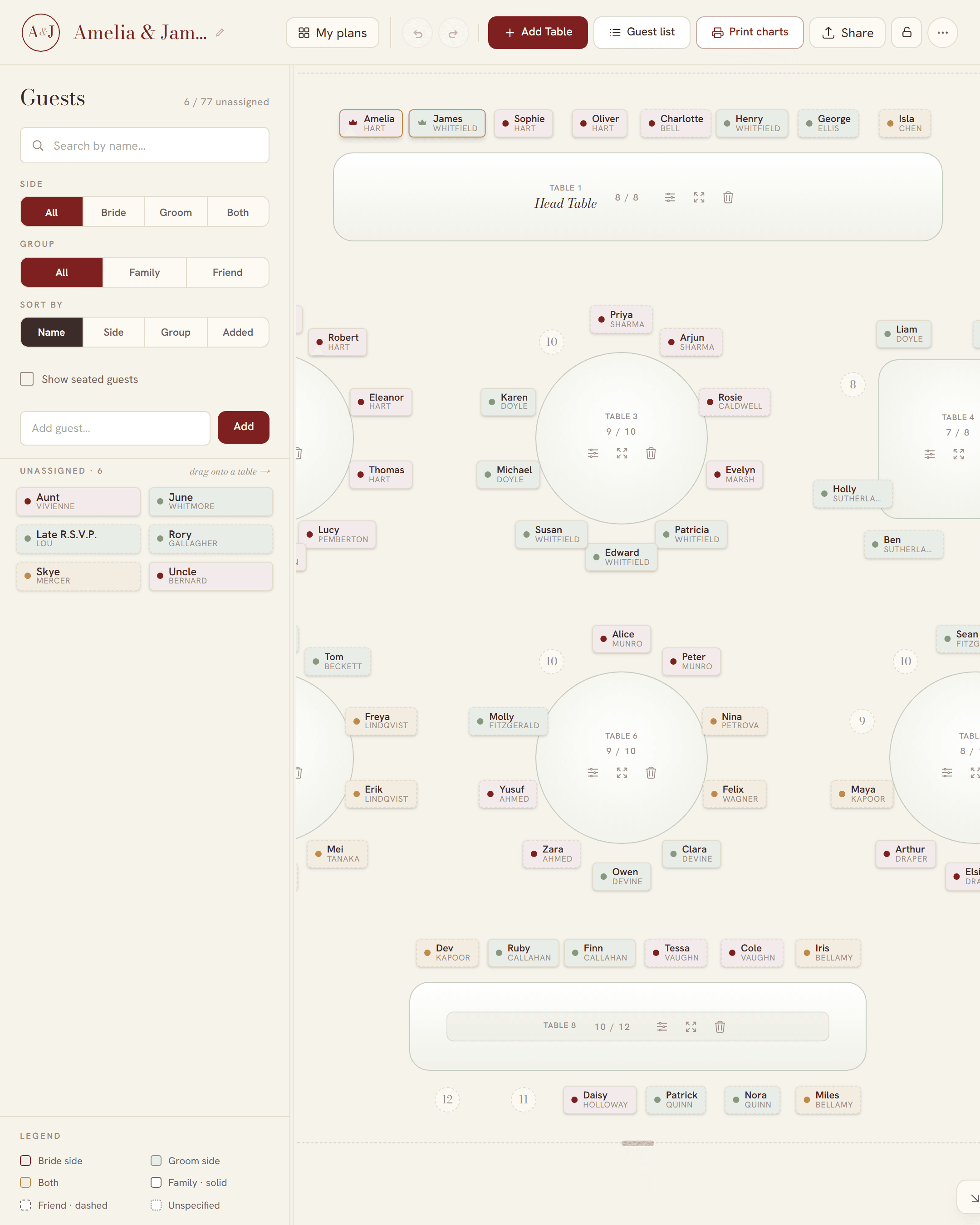
SeatFlow does one job: the seating. It is free for every guest on your list, and there is nothing to unlock.
- No account, no email address and no app. A plan opens in the browser and lives at its own private link.
- No guest limit and no table limit.
- Your guest list comes in from a spreadsheet: upload a CSV file, or paste the rows.
- Round, banquet, all-sides and one-sided head tables, each with numbered seats, so you decide who sits next to whom.
- An RSVP status for each guest: Attending, Pending or Declined. A declined guest leaves the tables and never prints.
- One live link for your partner, family or planner, with an optional password for edits.
- Four print-ready files: a guest list (A4 to A0), a table poster (A3 to A0), table number cards and tent-fold place cards, all free and watermark-free.
- Version history, so an accidental change can be undone.
Dragging guests onto seats is easiest on a computer, and a tablet with a wide screen gets the full board too. On a phone you get a simpler view: add guests, then tap a guest and pick a table.
| At a glance | The Knot | SeatFlow |
|---|---|---|
| Price | Free app | Free |
| Seating chart | In the app for iPhone and iPad | The whole tool, in any browser |
| Account | A free account with The Knot | None |
| Sharing with a partner | The same login email and password | The plan’s link, with an optional edit password |
| Guest list | Built in, with an address form | Imported from a spreadsheet, or pasted |
| RSVPs | Guests reply on your wedding website at The Knot | You set each guest to Attending, Pending or Declined |
| Meal choices | Recorded from RSVPs | Not tracked |
| Printed seating chart sign | Large sign at US$59.99, printed for you | Free print-ready PDF, printed where you like |
| Place cards and table numbers | Sold as printed stationery | Free print-ready PDFs |
The Knot is a trademark of its owner. SeatFlow is independent and is not affiliated with The Knot.
WeddingWire’s seating chart: free, with an account
WeddingWire and The Knot are both brands of The Knot Worldwide (The Knot Worldwide, checked 24 October 2026). WeddingWire has its own seating chart tool, which it says is free. It starts with a WeddingWire sign-up. You draw a floor plan with tables, a dance floor and a DJ booth. Then you drag guests from your WeddingWire guest list into seats. You can print, email or export the chart (WeddingWire’s seating chart page, checked 24 October 2026).
SeatFlow does the same seating job with no account. It takes your guest list from a spreadsheet, so you do not need to type it again.
Moving your guest list to SeatFlow
- Get your guest list into a spreadsheet: Excel, Google Sheets or Numbers. The Knot’s guest list page says you can export your guests’ responses (The Knot guest list, checked 24 October 2026).
- Start a plan in SeatFlow. A short set-up asks about your tables, then your guest list.
- Paste the rows, or upload the CSV. Only the guest name is required. SeatFlow also reads side, group, table, seat number, role, RSVP and notes.
- If the spreadsheet has an RSVP column, SeatFlow reads it. Words such as Yes, No, Pending and Declined all work. A guest who declined is not seated.
- Let auto-seat make a first draft, then drag guests to the seats you want.
- If a column has an unusual heading, use Import CSV in the planner’s More menu to point it at the right field. You do not need to change the spreadsheet.
More detail on the import is in making a seating chart from your guest list.
Why use a separate tool for the seating?
It is a fair question. The Knot already holds your guest list and your RSVPs. But the seating is a different job. You need tables, seats and a plan that changes often: a late RSVP, a new plus-one, two relatives who must not share a table. SeatFlow does only that job, and it is free for the whole list. Zola has its own seating chart too: see our Zola guide. If you are just starting, read how to make a wedding seating chart first.