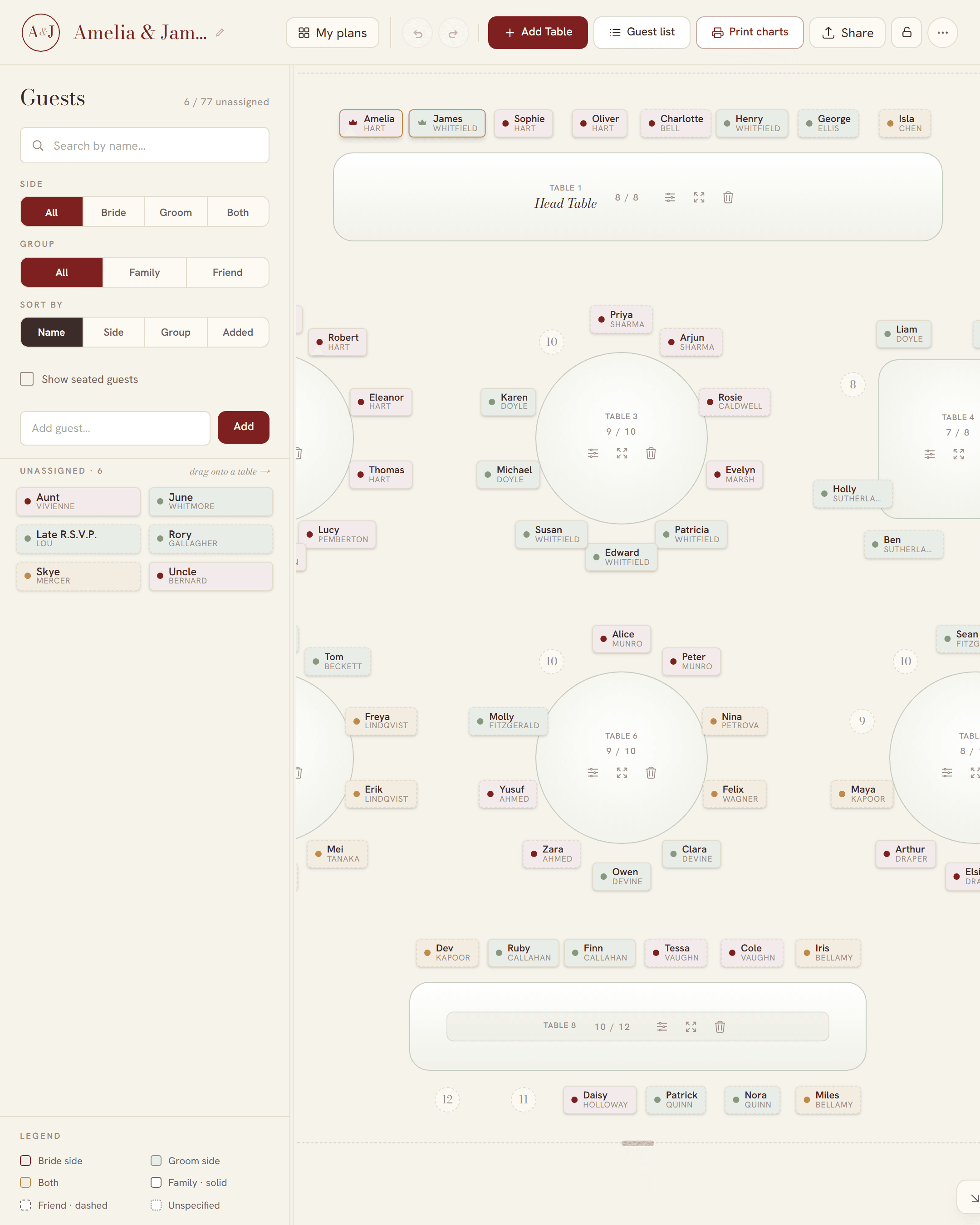
What a wedding table plan has to do
On the day, the table plan is a board on an easel by the door of the reception room. Guests walk up, find their own name, and go to their table. Everything before that is the hard part: fitting a guest list onto the tables your venue actually has, keeping the right people apart, and getting both families to agree.
So a useful table plan maker does two jobs. It lets you move people around until the plan works, and then it prints the board from that same plan, so the board can never disagree with what you decided.
Setting out the top table
The traditional British top table is one long table, with everyone sitting along one side and facing the room. Read from the left as your guests look at it, the traditional order, as Debrett's gives it (checked 4 November 2026), is:
- Chief bridesmaid
- Groom's father
- Bride's mother
- Groom
- Bride
- Bride's father
- Groom's mother
- Best man
Plenty of couples change it. Parents who are no longer together, step-parents, two brides or two grooms, or simply a wish to sit with your friends all make a different order the right one. Some couples drop the top table for a sweetheart table for two, or put each set of parents at the head of their own round table. Our guide to head table seating goes through the options and who usually sits where.
In SeatFlow, a one-sided table seats everyone in a single row facing the room. Its seats are numbered, so you drop each person onto the exact chair rather than just onto the table.
Round tables for everyone else
Most UK venues use round tables for the rest of the room. Ask the venue which size they have, because it decides how many tables you need:
- A 5 ft round (152 cm) seats 8 comfortably, and 10 at a squeeze.
- A 6 ft round (183 cm) seats 10 comfortably, and 12 at most.
- Long trestle tables seat guests down both sides, for a barn or family-style meal.
Set each table to its real size in SeatFlow. If you seat more guests than a table holds, it turns red and shows how many over you are, so you see the problem on the plan instead of at the venue. For the measurements behind these numbers, see how many guests fit at each wedding table.
Starting from your guest list
You probably keep the guest list in Excel, Google Sheets or Numbers already. Save it as a CSV file and import it, or copy the names and paste them straight in. Every guest becomes a card you can drag onto a table. Only the name is required; side, group, table, seat and notes come in too if your spreadsheet has them. The full detail is in making a seating chart from your guest list.
The table plan board
SeatFlow prints two kinds of board from your plan. Pick the one that suits how your guests will use it:
- Guest list: every guest A to Z by surname, with their table number. Guests look for their own name, so this is the quickest board to read at a busy entrance.
- Table poster: one block per table, in table number order, with the names at each table. It shows the whole room at a glance.
Which size to print
| Size | Guests | Good for |
|---|---|---|
| A3 · 297 × 420 mm | Up to about 40 | A small wedding, or a second board by the bar |
| A2 · 420 × 594 mm | About 30 to 100 | Most weddings, on an easel at the entrance |
| A1 · 594 × 841 mm | About 80 to 180 | Larger weddings, on foam board |
| A0 · 841 × 1189 mm | About 150 to 300 | Big weddings, read from a step back |
Each board comes in four colourways: burgundy, sage, gold, and black and white. A-series sizes are what UK print shops work in, so the PDF goes to the printer at its own size, ready to mount on foam board or print on poster paper. For more on the poster itself, see the printable seating chart poster.
Table numbers and place cards to match
The same plan also prints the smaller stationery, in the same colourway as the board:
- Table number cards: one large number per table, on a 5 × 7 inch card that any photo lab can print.
- Place cards: tent-fold cards with each guest's name, six to an A4 sheet with fold and cut guides, so you can print them at home.
A free wedding table plan template
Start from the free guest list template (CSV). It opens in Excel, Google Sheets or Numbers, has one row per guest, and imports into a new plan with no warnings. The four print layouts are the rest of the template: the guest list, the table poster, the table number cards and the place cards. Fill in the CSV, import it, and print. More on the file in the wedding seating chart Excel template.
Planning it together
A table plan is rarely one person's job. Send the plan's link to your partner, a parent or your venue coordinator and they open the same plan, not a copy. Changes show up on everyone's screen as they are made, and two people moving guests at different tables at the same time will not overwrite each other. If you would rather nobody else could make changes, set a password on the plan: anyone with the link can still look, but only someone with the password can edit.
How to make your table plan in SeatFlow
- Start a plan. It opens straight away, with no sign-up.
- Import your guest list, or paste the names in.
- Set up the top table and the round tables to match your venue.
- Drag each guest onto a table, or onto a numbered seat.
- Send the link to whoever else needs a say.
- When the plan is final, download the board, table numbers and place cards.
If you are still at the stage of deciding who goes where, our guide on how to make a wedding seating chart sets out the order of work, from the RSVP deadline to the board on the easel.